\
**Category:** programming\
**Created:** [November 23, 2014, 12:06am UTC](https://forum.kirupa.com/t/accessing-your-webcam-in-html5/352092 "2014-11-23T00:06:38Z")\
**Posts on this page:** 20\
**Page:** 5
**Author:**  [@Rajeshwari\_S](https://forum.kirupa.com/u/Rajeshwari_S)\
**Post date:** [May 2, 2020, 11:29pm UTC](https://forum.kirupa.com/t/accessing-your-webcam-in-html5/352092/86 "2020-05-02T23:29:52Z")
Hi Kirupa,
Is it stopped to working at chrome in iPhone OS 13.4.1?
The website is hosted in https secured server. But when the users upgrade OS to 13.4.1 in their iPhone then it asking ‘Please install an external camera device’ when opening the site and doesn’t open camera. Please help to solve this issue.
---
**Author:**  [@kirupa](https://forum.kirupa.com/u/kirupa)\
**Post date:** [May 2, 2020, 11:53pm UTC](https://forum.kirupa.com/t/accessing-your-webcam-in-html5/352092/87 "2020-05-02T23:53:44Z")
Hmm. Does it work in Safari?
---
**Author:**  [@Rajeshwari\_S](https://forum.kirupa.com/u/Rajeshwari_S)\
**Post date:** [May 3, 2020, 3:56am UTC](https://forum.kirupa.com/t/accessing-your-webcam-in-html5/352092/88 "2020-05-03T03:56:34Z")
Yes it is working at safari.
---
**Author:**  [@kirupa](https://forum.kirupa.com/u/kirupa)\
**Post date:** [May 3, 2020, 5:49am UTC](https://forum.kirupa.com/t/accessing-your-webcam-in-html5/352092/89 "2020-05-03T05:49:38Z")
Under iOS Privacy settings, does Chrome have permission to access the camera?
---
**Author:**  [@Rajeshwari\_S](https://forum.kirupa.com/u/Rajeshwari_S)\
**Post date:** [May 3, 2020, 7:45am UTC](https://forum.kirupa.com/t/accessing-your-webcam-in-html5/352092/90 "2020-05-03T07:45:54Z")
Yes in privacy settings for chrome there is an option to camera access as Request
---
**Author:**  [@Rajeshwari\_S](https://forum.kirupa.com/u/Rajeshwari_S)\
**Post date:** [May 4, 2020, 11:53am UTC](https://forum.kirupa.com/t/accessing-your-webcam-in-html5/352092/91 "2020-05-04T11:53:41Z")
Hi Kirupa,
DetectRTC.hasWebcam is getting false in chrome. Is the device.kind not considering “video”?. Can use any alternate one instead HTML5 video tag?
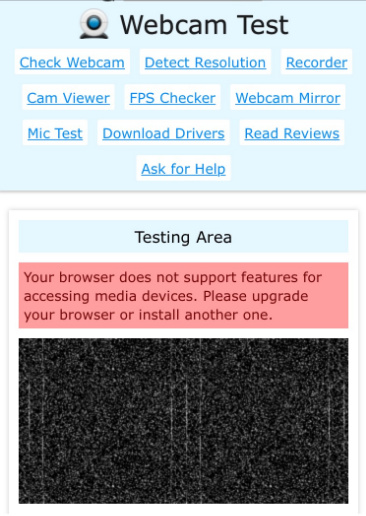
When testing with [https://webcamtests.com/](https://webcamtests.com/). It shows as in below screenshot. But I have checked this link after upgraded only.
---
**Author:**  [@manasiya\_sumail](https://forum.kirupa.com/u/manasiya_sumail)\
**Post date:** [June 22, 2020, 2:35pm UTC](https://forum.kirupa.com/t/accessing-your-webcam-in-html5/352092/92 "2020-06-22T14:35:58Z")
Hi kirupa,
i tired your code in my Django project and its working fine in the same laptop in which i run localhost server. but when i trying to open in my android mobile by local area network the html page is open but nothing shows, not detecting camera, no error, nothing.
how can i run it in mobile?
---
**Author:**  [@kirupa](https://forum.kirupa.com/u/kirupa)\
**Post date:** [June 22, 2020, 2:48pm UTC](https://forum.kirupa.com/t/accessing-your-webcam-in-html5/352092/93 "2020-06-22T14:48:45Z")
Does the example in the tutorial work on your android mobile device?
---
**Author:**  [@manasiya\_sumail](https://forum.kirupa.com/u/manasiya_sumail)\
**Post date:** [June 22, 2020, 3:29pm UTC](https://forum.kirupa.com/t/accessing-your-webcam-in-html5/352092/94 "2020-06-22T15:29:40Z")
no dear its only working in my laptop browser, but when i enter the " ip address : port " in android mobile browser it only shows the page with video frame but camera not streaming.
does it required further code for android devices?
---
**Author:**  [@kirupa](https://forum.kirupa.com/u/kirupa)\
**Post date:** [June 22, 2020, 5:15pm UTC](https://forum.kirupa.com/t/accessing-your-webcam-in-html5/352092/95 "2020-06-22T17:15:47Z")
No, there is no additional code needed. Just to clarify, does the example in this page work in your Android device?
> **[Accessing Your Webcam in HTML5](https://www.kirupa.com/html5/accessing_your_webcam_in_html5.htm)**
>
> Learn how the video element combined with the getUserMedia function can help you display your webcam's video stream in the browser.
---
**Author:**  [@manasiya\_sumail](https://forum.kirupa.com/u/manasiya_sumail)\
**Post date:** [June 23, 2020, 7:45am UTC](https://forum.kirupa.com/t/accessing-your-webcam-in-html5/352092/96 "2020-06-23T07:45:59Z")
yes dear the example in this page is working fine on my android mobile, that’s why i am curious that how your example working and same code i am applying is not working.
---
**Author:**  [@manasiya\_sumail](https://forum.kirupa.com/u/manasiya_sumail)\
**Post date:** [June 23, 2020, 7:56am UTC](https://forum.kirupa.com/t/accessing-your-webcam-in-html5/352092/97 "2020-06-23T07:56:25Z")
Is that something about front camera or back camera? or about https:? because in localhost it runs on http:
---
**Author:**  [@kirupa](https://forum.kirupa.com/u/kirupa)\
**Post date:** [June 23, 2020, 8:11am UTC](https://forum.kirupa.com/t/accessing-your-webcam-in-html5/352092/98 "2020-06-23T08:11:02Z")
Ah! The **http** part is the problem. It needs to be https, and there are articles online that explain how to get that enabled for localhost using whatever build/testing setup you have going 😀
---
**Author:**  [@manasiya\_sumail](https://forum.kirupa.com/u/manasiya_sumail)\
**Post date:** [June 23, 2020, 8:39am UTC](https://forum.kirupa.com/t/accessing-your-webcam-in-html5/352092/99 "2020-06-23T08:39:00Z")
Oh! OK got it, thanks for your help dear. I am so satisfy with your forum.
---
**Author:**  [@lady\_k](https://forum.kirupa.com/u/lady_k)\
**Post date:** [September 8, 2020, 9:26pm UTC](https://forum.kirupa.com/t/accessing-your-webcam-in-html5/352092/100 "2020-09-08T21:26:24Z")
Hey there - wondering if there is a way to display multiple streams on the same page? All from the same camera, same image. I tried to do this assigning a class instead of an id but I’m not getting much success:
https://codepen.io/kateladenheim/embed/preview/dyMdKOr?height=300&slug-hash=dyMdKOr&default-tabs=html,result&host=https://codepen.io
To be clear: I’m not trying to add a second webcam, just trying to get the same version to show up multiple times.
Thanks for your help!
---
**Author:**  [@jaimestuardo](https://forum.kirupa.com/u/jaimestuardo)\
**Post date:** [September 28, 2020, 9:39pm UTC](https://forum.kirupa.com/t/accessing-your-webcam-in-html5/352092/101 "2020-09-28T21:39:58Z")
Hello, do you have a tutorial about how to send that stream to a RTMP server?
Thanks
Jaime
---
**Author:**  [@kirupa](https://forum.kirupa.com/u/kirupa)\
**Post date:** [October 1, 2020, 7:17am UTC](https://forum.kirupa.com/t/accessing-your-webcam-in-html5/352092/102 "2020-10-01T07:17:07Z")
No - that gets too much into the weeds of whatever service you end up using. The closest is this article: [https://www.kirupa.com/html5/simple\_video\_chat\_with\_webrtc.htm](https://www.kirupa.com/html5/simple_video_chat_with_webrtc.htm)
😀
---
**Author:**  [@WTCC\_Carpentry](https://forum.kirupa.com/u/WTCC_Carpentry)\
**Post date:** [October 9, 2020, 3:56pm UTC](https://forum.kirupa.com/t/accessing-your-webcam-in-html5/352092/103 "2020-10-09T15:56:25Z")
Hey, This was awesome. I teach Carpentry and in 5 minutes with a little copy and pasting and some pruning I got it to work for my needs. 2 questions, can you select another video device? The default is the webcam on my laptop. I have a GoPro HERO 8 that I want to be able to display onto (into) chrome as a document camera work around. If I can do it, how? I basically need to identify a new source for the video… remember I’m a carpenter so go… s…l…o…w. Cheers, Peter
---
**Author:**  [@krilnon](https://forum.kirupa.com/u/krilnon)\
**Post date:** [October 9, 2020, 10:13pm UTC](https://forum.kirupa.com/t/accessing-your-webcam-in-html5/352092/104 "2020-10-09T22:13:33Z")
We’ll have to wait for the full instructions from Kirupa, but the short version is:
- You probably need [GoPro Webcam desktop utility](https://gopro.com/en/us/news/how-to-use-gopro-for-webcam).
- Use [`enumerateDevices`](https://developer.mozilla.org/en-US/docs/Web/API/MediaDevices/enumerateDevices) to pick from a list of video devices.
---
**Author:**  [@WTCC\_Carpentry](https://forum.kirupa.com/u/WTCC_Carpentry)\
**Post date:** [October 13, 2020, 3:08pm UTC](https://forum.kirupa.com/t/accessing-your-webcam-in-html5/352092/105 "2020-10-13T15:08:27Z")
Thanks for the quick reply. I have the GoPro desktop utility and it will allow the go pro to be used in Zoom, go to meeting ect. I want to be able to use the camera outside of social media/meeting applications. I could use chrome to “host” the video.
I am not sure where in the HTML5 code to place the enumerateDevices command. I have tried several places but haven’t gotten it to execute. Any advice?
[Previous page](https://forum.kirupa.com/t/accessing-your-webcam-in-html5/352092.md?page=4)
[Next page](https://forum.kirupa.com/t/accessing-your-webcam-in-html5/352092.md?page=6)