# Font Size and Break Tags

**URL:** https://forum.kirupa.com/t/font-size-and-break-tags/644902
**Category:** Uncategorized
**Created:** [November 10, 2020, 3:36pm UTC](https://forum.kirupa.com/t/font-size-and-break-tags/644902 "2020-11-10T15:36:27Z")
**Posts on this page:** 6
**Page:** 1

<div class="post-metadata">

### Author: ![John\_Stern](https://yyz1.discourse-cdn.com/flex011/user_avatar/forum.kirupa.com/john_stern/32/12050_2.png) [@John\_Stern](https://forum.kirupa.com/u/John_Stern)
#### Post date: [November 10, 2020, 3:36pm UTC](https://forum.kirupa.com/t/font-size-and-break-tags/644902/1 "2020-11-10T15:36:27Z")

</div>

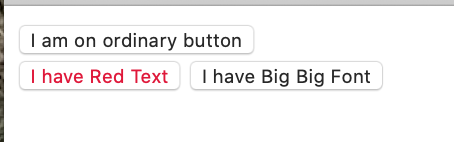
![Screen Shot 2020-11-10 at 8.29.24 AM](https://canada1.discourse-cdn.com/flex011/uploads/kirupa/original/2X/9/90783310e69b5d4f88f2f646073b1daeb16925d1.png)

```
<!DOCTYPE html>
<html>
<head>
  <title>Getting a Custom Button</title>
  <style>
      .red{color: rgb(228, 9, 53);}
      .big(font:bold 50px Arial)
  </style>
</head>
<body>
  <button>I am on ordinary button</button><br>
  <button class="red">I have Red Text</button><b></b>
  <button class="big">I have Big Big Font</button>
  
</body>
</html>

//line 7 - increasing 50px to 100px doesn't make the font any larger - 
why?
the <br> on line 11 does result in the next 2 buttons being on
a different line but the <br> on line 12 doesn't result in the 
last button being on its own line - why?//

```

---

<div class="post-metadata">

### Author: ![John\_Stern](https://yyz1.discourse-cdn.com/flex011/user_avatar/forum.kirupa.com/john_stern/32/12050_2.png) [@John\_Stern](https://forum.kirupa.com/u/John_Stern)
#### Post date: [November 10, 2020, 3:58pm UTC](https://forum.kirupa.com/t/font-size-and-break-tags/644902/2 "2020-11-10T15:58:48Z")

</div>

I have been playing with this code since I posted it and I see the font size problem is due to the wrong enclosures following .big - should have been { }  
instead of ( ) - the mystery of not getting a line break following the “I have Red Text” line, remains a problem

---

<div class="post-metadata">

### Author: ![senocular](https://yyz1.discourse-cdn.com/flex011/user_avatar/forum.kirupa.com/senocular/32/7217_2.png) [@senocular](https://forum.kirupa.com/u/senocular)
#### Post date: [November 10, 2020, 6:11pm UTC](https://forum.kirupa.com/t/font-size-and-break-tags/644902/3 "2020-11-10T18:11:38Z")

</div>

> [@John\_Stern](#):
>
> the mystery of not getting a line break following the “I have Red Text” line, remains a problem

You have bold tags (`<b></b>`) after the second button, not a line break (`<br>`) tag.

---

<div class="post-metadata">

### Author: ![ariful](https://avatars.discourse-cdn.com/v4/letter/a/bbce88/32.png) [@ariful](https://forum.kirupa.com/u/ariful)
#### Post date: [November 12, 2020, 4:23am UTC](https://forum.kirupa.com/t/font-size-and-break-tags/644902/4 "2020-11-12T04:23:16Z")

</div>

Try this code, It’s work on my pc.

 ![html](https://canada1.discourse-cdn.com/flex011/uploads/kirupa/original/2X/4/40512d07f58616c41b2716b07b34338abe52c9f1.png)

---

<div class="post-metadata">

### Author: ![John\_Stern](https://yyz1.discourse-cdn.com/flex011/user_avatar/forum.kirupa.com/john_stern/32/12050_2.png) [@John\_Stern](https://forum.kirupa.com/u/John_Stern)
#### Post date: [November 14, 2020, 6:09pm UTC](https://forum.kirupa.com/t/font-size-and-break-tags/644902/5 "2020-11-14T18:09:37Z")

</div>

OK - that was easy - I apparently have to take more care with my coding it would seem.

---

<div class="post-metadata">

### Author: ![senocular](https://yyz1.discourse-cdn.com/flex011/user_avatar/forum.kirupa.com/senocular/32/7217_2.png) [@senocular](https://forum.kirupa.com/u/senocular)
#### Post date: [November 15, 2020, 10:50am UTC](https://forum.kirupa.com/t/font-size-and-break-tags/644902/6 "2020-11-15T10:50:50Z")

</div>

You’ll get better at catching these things more easily with time. 😉
